Every VU student reaches a point where VULMS alone does not feel like enough. You need a place to research your assignment, a tool to fix your grammar, a way to understand a tricky programming concept, or simply a shortcut to finish your GDB faster without losing quality. That is exactly where the right websites for VU students make all the difference.
Virtual University gives you the syllabus, the lectures, and the deadlines. But it does not hand you the research skills, writing polish, or technical practice you need to actually score well. Thousands of VU students waste hours searching randomly for tools that could take seconds to find if they knew where to look. This guide fixes that problem once and for all.
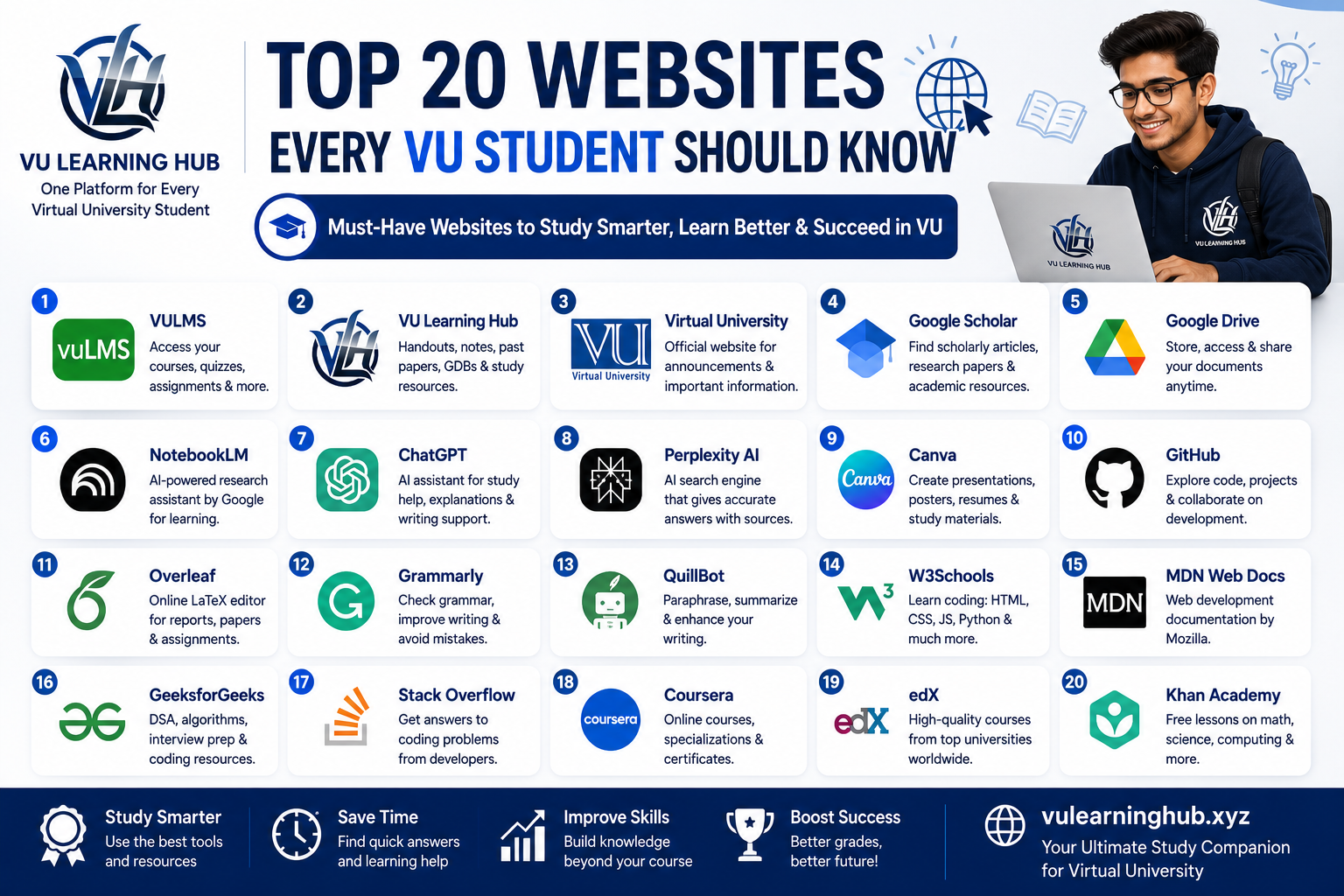
Below is a carefully picked list of 20 websites that cover everything from official VU portals to AI research tools, coding practice platforms, and free online courses. Whether you are a BSCS student stuck on a C++ assignment or a BBA student writing a report, there is something here for you. Let us go through them one by one.
Official VU Platforms You Cannot Skip
Before jumping into external tools, every student must be fully comfortable with the platforms Virtual University itself provides. These are non negotiable because your grades, attendance, and academic record depend directly on them.
VULMS
VULMS, or Virtual University Learning Management System, is the backbone of your entire degree. This is where you attend online lectures, submit assignments, take quizzes, participate in GDBs, and check your results. If you are new to VU, spend your first week just exploring every tab on VULMS. Many students lose marks simply because they missed a quiz deadline or did not know where the assignment upload button was hidden.
Virtual University Official Website
The main VU website, vu.edu.pk, is different from VULMS. This is where you find admission details, semester schedules, fee structure, examination datesheets, and official announcements. If you ever feel confused about a deadline shown somewhere else, this site is your source of truth.
VU Learning Hub
If VULMS is where you submit your work, VU Learning Hub is where you prepare for it. This platform offers subject wise study guides, solved assignments, quiz preparation material, and past papers that are organized specifically for VU students. Instead of digging through random Facebook groups for outdated files, students use VU Learning Hub to get accurate, updated resources built around the actual VU curriculum. It has quickly become one of the most trusted second homes for VU students who want to study smart instead of studying longer.
Research and Academic Tools That Save You Hours
Good research separates an average assignment from an excellent one. These tools help you find credible information fast and organize it in a way that actually makes sense.
Google Scholar
Google Scholar is a free search engine dedicated to academic papers, theses, books, and citations. If your assignment or final year project requires credible references, this should always be your first stop instead of a regular Google search. It filters out unreliable blogs and shows you peer reviewed material, which instructors respect far more.
Google Drive
Google Drive is more than just cloud storage. VU students use it to back up assignments before submission, share group project files with classmates, and access their notes from any device. Since VULMS sometimes has file size limits, keeping a backup on Drive can save you from last minute submission panic.
NotebookLM
NotebookLM is Google's AI powered research assistant that lets you upload your own documents, PDFs, or lecture slides and then ask questions directly from that content. For VU students dealing with lengthy handouts, this tool can summarize chapters, generate quick study notes, and even create audio overviews of your course material. It is particularly useful during exam preparation when you need to revise dozens of pages in a short time.
AI Tools Every VU Student Should Learn to Use Properly
AI tools are not shortcuts to cheat your way through a degree. Used correctly, they help you understand concepts faster and write more clearly. The key is learning to use them as a study partner, not a replacement for your own thinking.
ChatGPT
ChatGPT has become a daily companion for many VU students. It helps explain confusing lecture topics in simpler words, break down coding errors, or draft an outline for an assignment before you write it in your own words. The smartest students use it to understand concepts, not to copy paste answers, because instructors are increasingly good at spotting unoriginal work.
Perplexity AI
Perplexity AI works like a search engine combined with an AI assistant. Unlike ChatGPT, it always shows you the actual sources behind its answers, which makes it excellent for research heavy assignments. If you need current information along with citations, Perplexity often gives more reliable and verifiable results.
Design, Coding, and Writing Platforms
These tools cover the practical side of your degree, whether you are designing a presentation, writing code, or formatting a report that needs to look professional.
Canva
Canva makes designing presentations, posters, and infographics simple even if you have zero design background. Business and marketing students especially rely on Canva for creating polished presentations for their GDBs and final projects without needing expensive software like Photoshop.
GitHub
If you are studying computer science or software engineering, GitHub is where you store your code projects and build a portfolio that future employers will actually look at. Many VU instructors now ask students to submit programming assignments through GitHub repositories, so learning it early gives you a real advantage.
Overleaf
Overleaf is an online LaTeX editor used mainly by students writing research papers, theses, or final year projects that require precise academic formatting. If your BS thesis or research paper needs proper equations, citations, and structured formatting, Overleaf handles it far better than Microsoft Word.
Grammarly
Grammarly checks your assignments and reports for grammar mistakes, punctuation errors, and awkward sentence structure before you submit them. A single grammar heavy sentence can cost you marks even if your content is strong, so running your final draft through Grammarly takes only a minute and can genuinely improve your score.
QuillBot
QuillBot is a paraphrasing and summarizing tool that helps you rewrite sentences in your own words without losing the original meaning. It is especially useful when you understand a concept but struggle to explain it clearly, or when you need to condense a long paragraph into a short summary for a quiz answer.
Programming and Development Learning Websites
BSCS, BSSE, and BSIT students spend a huge chunk of their degree learning to code. These platforms are where real coding skills actually get built, far beyond what a single VU lecture can teach.
W3Schools
W3Schools remains one of the easiest places to learn web development basics like HTML, CSS, JavaScript, and PHP. Its simple explanations and try it yourself editor let you test code directly in the browser, which is perfect for beginners who learn best by experimenting.
MDN Web Docs
MDN Web Docs, maintained by Mozilla, is the most trusted reference for web technologies. While W3Schools is great for quick learning, MDN gives you deeper, more accurate technical documentation once you move past the basics and need to understand how something actually works under the hood.
GeeksforGeeks
GeeksforGeeks covers programming concepts, data structures, algorithms, and interview preparation in a way that is directly useful for computer science coursework. If your VU course involves data structures or algorithms, this site often explains topics more clearly than a textbook, complete with code examples in multiple languages.
Stack Overflow
Every programmer, student or professional, eventually ends up on Stack Overflow. When your code throws an error you cannot solve, chances are someone else faced the exact same problem and already got an answer here. Learning to search Stack Overflow effectively is a skill that will serve you throughout your entire programming career.
Free Courses and Skill Building Platforms
Sometimes VU lectures move fast or skip depth on a topic you need to master. These platforms fill that gap with structured, often free courses from real universities and industry experts.
Coursera
Coursera partners with top universities and companies to offer courses on almost any subject, from data science to business management. Many VU students use Coursera to strengthen a weak area before an exam or to build extra skills that make their resume stand out after graduation. Several courses are free to audit if you only want the content without a certificate.
edX
edX works similarly to Coursera, offering university level courses from institutions like Harvard and MIT. It is particularly strong for computer science, business, and data related fields, and many courses can be accessed for free if you skip the paid certification option.
Khan Academy
Khan Academy is completely free and covers foundational subjects like mathematics, statistics, and basic sciences in a very beginner friendly way. If a VU course assumes you already know certain math or stats concepts and you feel lost, Khan Academy rebuilds that foundation step by step without any cost.
How to Actually Use These Websites Without Wasting Time
Having a list of 20 websites for VU students means nothing if you do not use them strategically. The biggest mistake students make is bookmarking everything and using nothing consistently. Instead, match the tool to the actual problem in front of you. If you are stuck writing an assignment introduction, that is a QuillBot or Grammarly moment, not a GitHub moment. If you cannot understand a lecture handout, that is when NotebookLM or ChatGPT should come in.
Build a simple routine around three categories. Use VULMS and the VU website daily since your deadlines live there. Use research and writing tools like Google Scholar, Grammarly, and Perplexity AI whenever you are working on an assignment or report. Use skill building platforms like Coursera, GeeksforGeeks, and Khan Academy during free time between semesters, not the night before an exam. This kind of structure prevents the common trap where students discover a great tool but forget it exists by the time they actually need it. For subject specific guidance and updated study material tailored to the VU syllabus, checking VU Learning Hub alongside these tools gives you a well rounded study system that covers both general skills and course specific content.
Common Mistakes VU Students Make With Online Tools
Many students either overuse or underuse these platforms, and both extremes hurt academic performance. Some students rely entirely on AI tools like ChatGPT to write full assignments without understanding the content themselves, which becomes obvious the moment an instructor asks a follow up question during a viva. Others avoid these tools completely out of fear of plagiarism, missing out on legitimate help that could improve their understanding and writing quality.
The middle ground works best. Use ChatGPT or Perplexity AI to understand a topic, then write the actual answer in your own words. Use Grammarly to polish your writing, not to generate it from scratch. Use GitHub to organize and showcase your own code, not code you copied without understanding. Instructors at Virtual University are generally not against tool usage itself, they are against submissions that show zero personal understanding or effort. Keeping this balance protects both your grades and your actual learning, which matters far more once you graduate and need these skills in a real job.
Final Thoughts
Virtual University gives every student flexibility, but that same flexibility means you need to build your own support system outside the classroom. The 20 websites for VU students covered in this guide, from VULMS and Virtual University's official portal to research tools like Google Scholar, AI assistants like ChatGPT and Perplexity AI, and coding resources like GitHub and Stack Overflow, together form a complete toolkit for getting through your degree with less stress and better grades.
Start small. Pick two or three tools from this list that solve your most immediate problem right now, whether that is grammar, research, or coding practice. Once they become part of your routine, add more gradually. And whenever you need VU specific study material, solved assignments, or exam preparation guides built around your actual courses, VU Learning Hub is designed exactly for that purpose.
Frequently Asked Questions
Is it allowed to use ChatGPT for VU assignments?
Virtual University does not officially ban AI tools, but assignments must reflect your own understanding. Use ChatGPT to learn a concept, then write your answer independently to avoid plagiarism issues.
Which website is best for VU students to find solved assignments and quizzes? VU Learning Hub is built specifically around the VU curriculum and offers updated study guides, solved assignments, and quiz preparation material organized by subject.
Do VU students need to pay for Coursera or edX courses?
No, most courses on both platforms can be audited for free. You only pay if you want an official certificate.
Are these websites useful for all VU programs, not just computer science?
Yes, tools like Grammarly, Google Scholar, Canva, and Coursera are useful across BBA, BS Education, BS Psychology, and almost every other VU program, while GitHub and coding platforms are more relevant to computer science and software engineering students.